Telegram Finance Tracker
Telegram mesajlarından gelir ve gider kaydeden; n8n, Gemini ve web panelini birleştiren kişisel finans takip sistemi.
- Proje türü
- Open Source
- Dil
- JavaScript
- Yıldız
- 0
- Fork
- 0
💸 Telegram Finance Tracker
Telegram üzerinden doğal dille gelir/gider kaydet, şık bir web panelinden takip et. Log income & expenses in natural language via Telegram, track them on a sleek web dashboard.




🧭 Genel Bakış / Overview
İki parçadan oluşur / Two parts:
- n8n workflow (Telegram bot) — Telegram'a yazdığın mesajı Google Gemini ile sınıflandırır
(gelir / gider / sorgu / silme),
expenses.jsonldosyasına yazar ve sana onay/rapor döner. - Web Dashboard — aynı
expenses.jsonldosyasını okuyup mobil-öncelikli, şık bir arayüzde gösterir; ekleme/düzenleme/silme (tam CRUD) yapar.
flowchart LR
    U[📱 Telegram] -->|mesaj| N[n8n + Gemini]
    N -->|append| F[(expenses.jsonl)]
    N -->|onay / rapor| U
    F <-->|read / CRUD| D[🖥️ Web Dashboard]
    D -.->|Cloudflare Tunnel| W[🌐 fa.example.com]
Tek bir veri kaynağı vardır:
expenses.jsonl. Bot ekler, dashboard okur ve düzenler. Single source of truth:expenses.jsonl. The bot appends, the dashboard reads & edits.
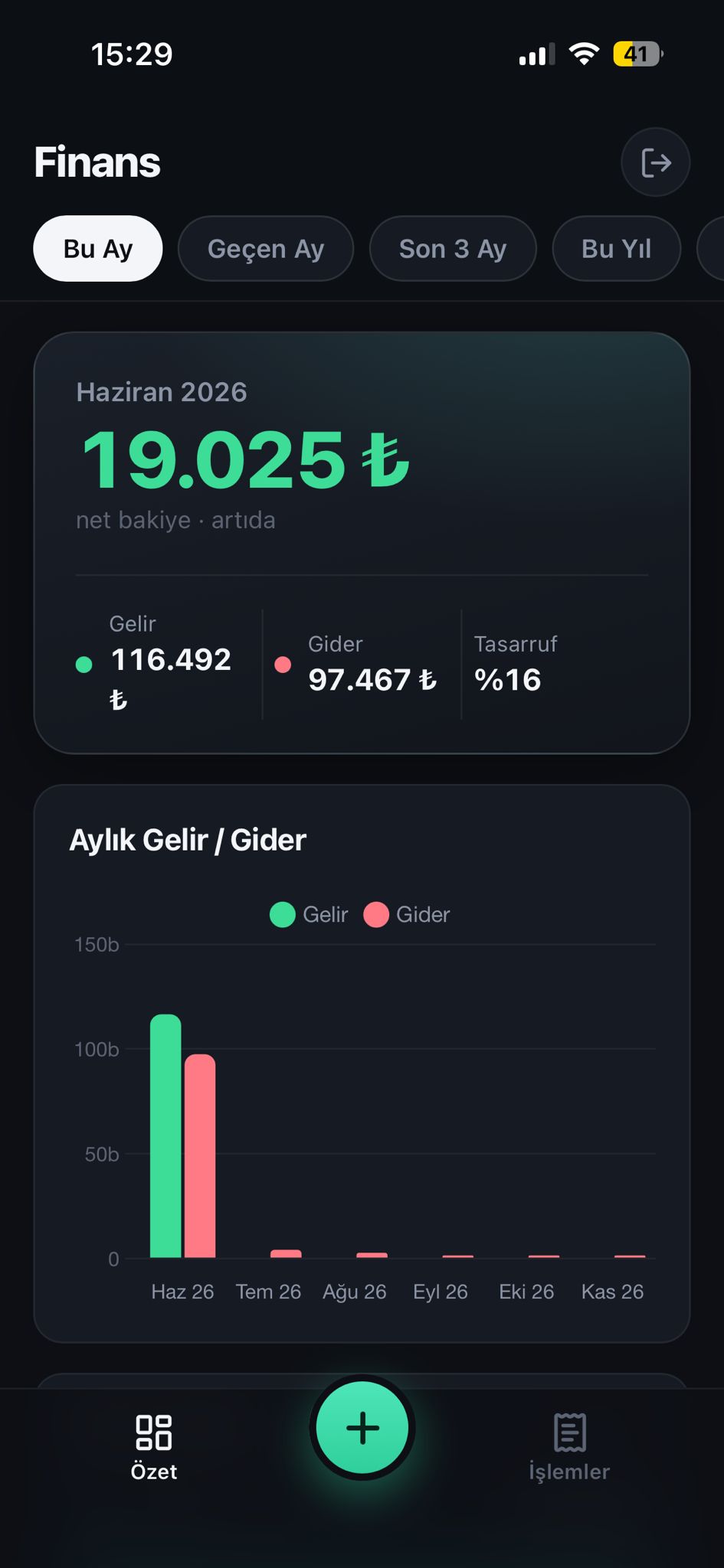
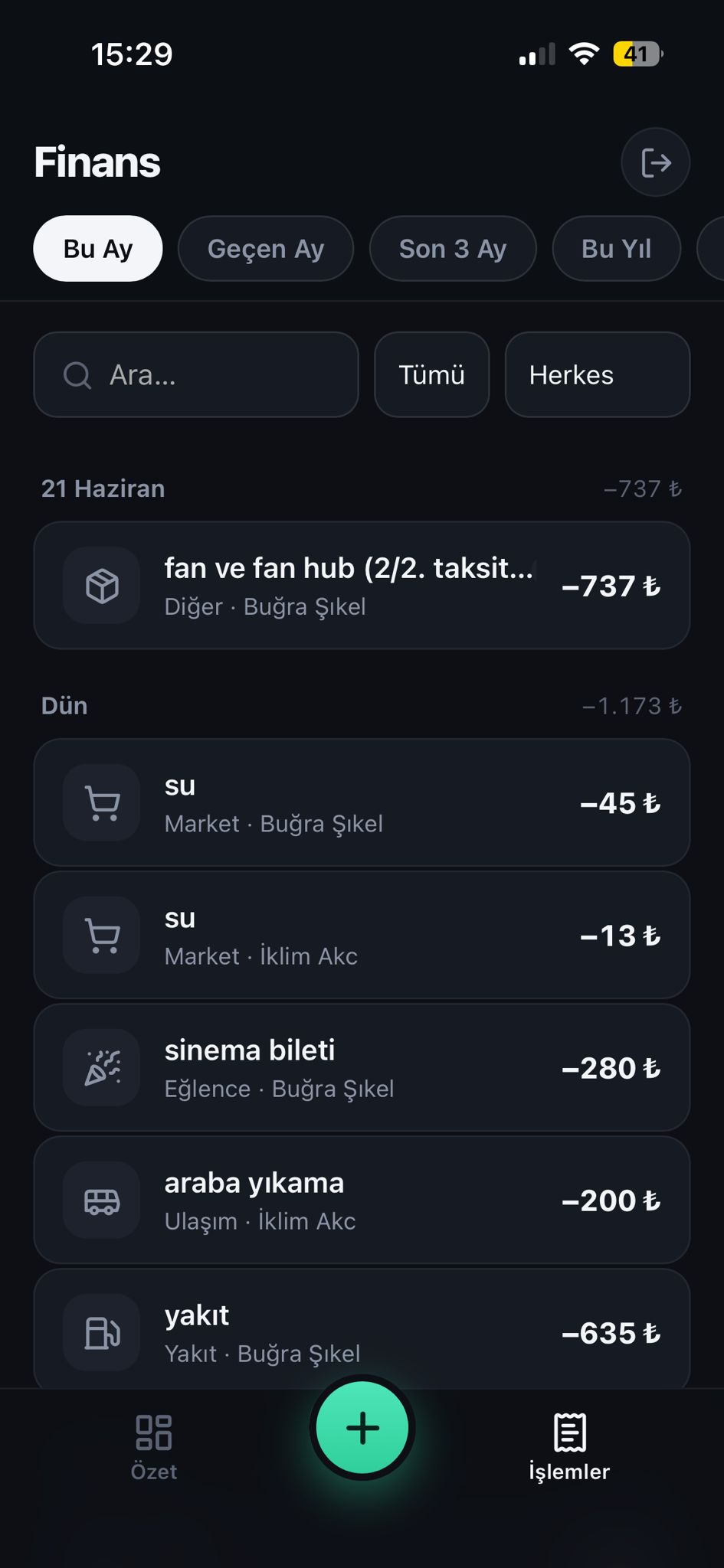
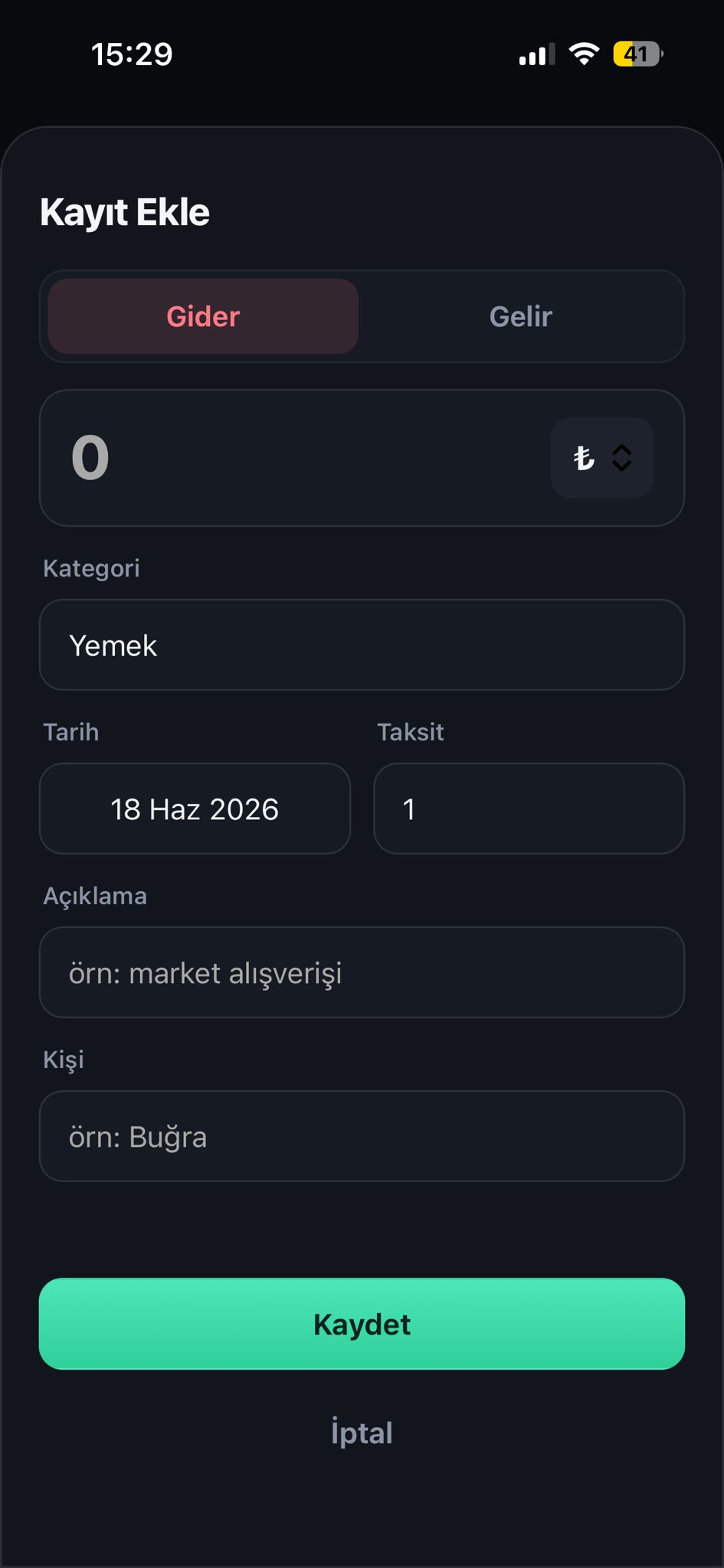
📸 Ekran Görüntüleri / Screenshots
| Özet / Overview | İşlemler / Transactions | Kayıt Ekle / Add |
|---|---|---|
 |  |  |
🇹🇷 Türkçe
✨ Özellikler
- 💬 Doğal dil: "100 tl market", "maaş yattı 50000", "kira geldi 15000", "8gb ram 1085 tl 3 taksit"
- 🤖 Akıllı sınıflandırma: Gelir / gider / sorgu / silme — Google Gemini ile
- 💳 Taksit desteği: Taksitli harcamalar otomatik aylara bölünür
- 📊 Sorgu & rapor: "bu ay net", "tasarruf oranımız ne", "geçen hafta yemek"
- 💱 Çoklu döviz: TL / EUR / USD / GBP (TL'ye çevrilerek özetlenir)
- 🖥️ Mobil-öncelikli panel: Net bakiye, aylık trend, kategori dağılımı, yaklaşan taksitler
- ✏️ Tam CRUD: Panelden de kayıt ekle / düzenle / sil
- 🔒 Şifreli giriş: httpOnly cookie + JWT
- 🎨 Profesyonel arayüz: Lucide ikonları, koyu tema, native uygulama hissi
- 📦 Tek container: Veritabanı yok — sadece bir JSONL dosyası
📋 Gereksinimler
- Çalışan bir n8n kurulumu (n8n.io)
- Telegram Bot Token (@BotFather'dan alın)
- Google Gemini API Key (Google AI Studio)
- Dashboard için Docker + Docker Compose
🚀 Kurulum
1) n8n Workflow (Telegram Bot)
- n8n'de Import from File ile
n8n/Telegram Harcama Kaydedici.jsondosyasını içe aktarın. - Kimlik bilgilerini bağlayın:
- Telegram Bot → BotFather token'ınız (workflow'da
PUT_YOUR_TELEGRAM_CRED_IDolan tüm node'lar). - Google Gemini (PaLM) API → Gemini API anahtarınız.
- Telegram Bot → BotFather token'ınız (workflow'da
- Veri dosyası yolu: Workflow
/data/downloads/expenses.jsonlyoluna yazar. n8n konteynerinizde bu klasörün bir host klasörüne bağlı (mount) olduğundan emin olun. Örnek:# n8n docker-compose içinde volumes: - /home/youruser/n8n_downloads:/data/downloadsBu host yolunu (
/home/youruser/n8n_downloads) dashboard'da da kullanacağız. - Workflow'u Active yapın ve Telegram'dan bota bir mesaj atarak test edin.
2) Web Dashboard
git clone https://github.com/<kullanici>/telegram-finance-tracker.git
cd telegram-finance-tracker

cp .env.example .env
# .env dosyasını düzenleyin:
#   APP_PASSWORD       -> güçlü bir şifre
#   SESSION_SECRET     -> openssl rand -hex 32
#   N8N_DOWNLOADS_DIR  -> n8n'in expenses.jsonl yazdığı HOST klasörü

docker compose up -d --build
Panel artık http://<sunucu-ip>:8095 adresinde. Giriş: .env'deki kullanıcı adı + şifre.
n8n veri yolunu bulma:
docker inspect <n8n-konteyner-adı> \
  --format '{{range .Mounts}}{{.Source}} -> {{.Destination}}{{"\n"}}{{end}}'
/data/downloads(veya benzeri) hedefine karşılık gelen Source yolunu.enviçindekiN8N_DOWNLOADS_DIR'e yazın.
3) (İsteğe bağlı) Cloudflare Tunnel ile uzaktan erişim
Token tabanlı bir cloudflared kullanıyorsanız, Zero Trust → Networks → Tunnels → Public Hostname → Add:
- Subdomain:
faDomain:example.com - Service:
HTTP→<sunucu-lan-ip>:8095
Birkaç dakikada https://fa.example.com üzerinden erişilir (TLS Cloudflare'de).
💬 Kullanım (Telegram)
| Niyet | Örnek mesaj |
|---|---|
| Gider | 100 tl market, kahve 50, akşam yemeği 250 |
| Gelir | maaş yattı 50000, freelance 3000 dolar, kira geldi 15000 |
| Taksit | 1085 tl 8gb ram aldım 3 taksit böldüm |
| Sorgu | bu ay net, tasarruf oranımız ne, geçen hafta yemek |
| Silme | son kaydı sil, 100 tl market harcamasını sil, dünkü maaşı sil |
🖥️ Kullanım (Dashboard)
- Özet: net bakiye, gelir/gider, tasarruf oranı, aylık trend, kategori dağılımı, yaklaşan taksitler
- İşlemler: güne göre gruplu liste; ara, türe/kişiye göre süz
- + (FAB): yeni kayıt ekle (taksitli dahil)
- Bir işleme dokun → düzenle veya sil (taksitliyse tüm seriyi silebilirsin)
- Üstteki dönem çipleriyle (Bu Ay, Geçen Ay, Son 3 Ay, Bu Yıl, Tümü, Özel) tarih aralığını seç
🇬🇧 English
✨ Features
- 💬 Natural language: "100 tl market", "salary 50000", "rent income 15000", "8gb ram 1085 3 installments"
- 🤖 Smart classification: income / expense / query / delete — via Google Gemini
- 💳 Installments: installment purchases are auto-split across months
- 📊 Queries & reports: "net this month", "what's our savings rate", "food last week"
- 💱 Multi-currency: TRY / EUR / USD / GBP (summarized in TRY)
- 🖥️ Mobile-first dashboard: net balance, monthly trend, category breakdown, upcoming installments
- ✏️ Full CRUD: add / edit / delete from the dashboard too
- 🔒 Password login: httpOnly cookie + JWT
- 🎨 Professional UI: Lucide icons, dark theme, native-app feel
- 📦 Single container: no database — just a JSONL file
The bot's prompts and messages are in Turkish. To use English, translate the prompt texts inside the n8n workflow's LLM nodes.
📋 Prerequisites
- A running n8n instance (n8n.io)
- A Telegram Bot Token (from @BotFather)
- A Google Gemini API Key (Google AI Studio)
- Docker + Docker Compose for the dashboard
🚀 Setup
1) n8n Workflow (Telegram bot)
- In n8n, Import from File →
n8n/Telegram Harcama Kaydedici.json. - Connect credentials: Telegram Bot token (every
PUT_YOUR_TELEGRAM_CRED_IDnode) and the Google Gemini (PaLM) API key. - Data path: the workflow writes to
/data/downloads/expenses.jsonl. Make sure that folder in your n8n container is bind-mounted to a host folder, e.g.:volumes: - /home/youruser/n8n_downloads:/data/downloads - Set the workflow Active and message your bot to test.
2) Web Dashboard
git clone https://github.com/<user>/telegram-finance-tracker.git
cd telegram-finance-tracker

cp .env.example .env
# Edit .env:
#   APP_PASSWORD       -> a strong password
#   SESSION_SECRET     -> openssl rand -hex 32
#   N8N_DOWNLOADS_DIR  -> the HOST folder n8n writes expenses.jsonl into

docker compose up -d --build
Open http://<server-ip>:8095 and log in with the credentials from .env.
Find the n8n data path:
docker inspect <n8n-container> \
  --format '{{range .Mounts}}{{.Source}} -> {{.Destination}}{{"\n"}}{{end}}'
Put the Source that maps to
/data/downloadsintoN8N_DOWNLOADS_DIR.
3) (Optional) Remote access via Cloudflare Tunnel
With a token-based cloudflared, in Zero Trust → Networks → Tunnels → Public Hostname → Add:
- Subdomain:
faDomain:example.com - Service:
HTTP→<server-lan-ip>:8095
🖥️ Dashboard usage
- Overview: net balance, income/expense, savings rate, monthly trend, category breakdown, upcoming installments
- Transactions: grouped by day; search, filter by type/person
- + (FAB): add a new record (installments supported)
- Tap a transaction → edit or delete (delete the whole series if it's an installment)
- Use the period chips up top to change the date range
⚙️ Yapılandırma / Configuration
| Değişken / Variable | Varsayılan / Default | Açıklama / Description |
|---|---|---|
APP_PASSWORD | — (zorunlu) | Giriş şifresi / Login password |
SESSION_SECRET | — (zorunlu) | JWT imzalama anahtarı / JWT signing key |
APP_USERNAME | admin | Giriş kullanıcı adı / Login username |
N8N_DOWNLOADS_DIR | ./data/downloads | expenses.jsonl'in host klasörü / host folder |
APP_PORT | 8095 | Host portu / Host port |
APP_UID / APP_GID | 1000 | Konteyner kullanıcısı (dosya sahibiyle aynı olmalı) / container user (must match file owner) |
TOKEN_TTL_DAYS | 30 | Oturum süresi (gün) / Session lifetime (days) |
CURRENCY_RATES | {"TL":1,"EUR":47,"USD":41,"GBP":53} | TL'ye çevrim kurları / TRY conversion rates |
🗂️ Veri Formatı / Data Format
expenses.jsonl — her satır bir JSON kaydı / one JSON record per line:
{"type":"expense","ts":"2026-06-18 14:30:00","user":"Buğra","amount":100,
 "currency":"TL","category":"market","description":"market alışverişi",
 "raw":"100 tl market","confidence":0.95}
Taksitli kayıtlarda ek alanlar / installment records add:
installment_total, installment_index, installment_count.
🔐 Güvenlik / Security
- Panel herkese açık bir domain'e veriliyorsa güçlü
APP_PASSWORDkullanın. Use a strongAPP_PASSWORDif the dashboard is exposed publicly. - İsterseniz ek katman olarak Cloudflare Access (Zero Trust) ekleyin. Optionally add Cloudflare Access as an extra layer.
.envdosyasını asla commit'lemeyin (.gitignore'da). Never commit.env.
🧱 Teknoloji / Tech Stack
- Backend: Node.js + Express (JWT auth, atomik dosya yazımı / atomic file writes)
- Frontend: Vanilla JS + Chart.js + Lucide (inline SVG)
- Bot/Automation: n8n + Google Gemini
- Deploy: Docker / Docker Compose (+ Cloudflare Tunnel opsiyonel)
🤝 Katkı / Contributing
Pull request ve issue'lar memnuniyetle karşılanır. PRs and issues are welcome.
📄 Lisans / License
🙏 Teşekkürler / Credits
n8n · Chart.js · Lucide · Google Gemini