Projelere Dön
Win Quick Translator
Fast, lightweight, and modern Windows translation app. macOS Spotlight-style interface that integrates seamlessly with your system.
Quick Translator 🌐
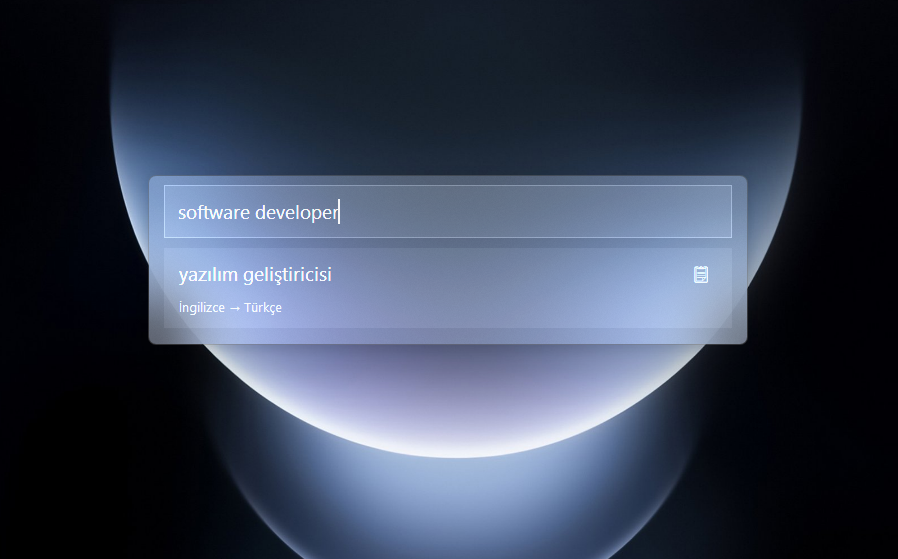
Fast, lightweight, and modern Windows translation app. macOS Spotlight-style interface that integrates seamlessly with your system.
Features ✨
- 🚀 Quick Access: Open instantly with
CTRL+SPACE(Customizable) - 🧠 Smart Translation:
- If you type in your Primary Language (e.g. Turkish) → Translates to English
- If you type in English (or other) → Translates to your Primary Language
- 🎨 Modern Interface: Windows 11 Acrylic Blur effect and rounded corners
- ⌨️ Keyboard Friendly: No mouse needed, just type and translate
- 🌗 Dark Mode: Stylish dark theme that's easy on the eyes
- 📌 System Tray: Runs quietly in the background, minimal resource usage
Download & Install 📦
Download Latest Version (Releases)
- Download
QuickTranslatorSetup.exe. - Complete the installation.
- Select your Primary Language and Hotkey on first launch.
Development & Building 🛠️
To develop the project on your own machine:
- Clone the repository:
git clone https://github.com/bugraskl/win-quick-translator.git
cd win-quick-translator
- Install requirements:
pip install -r requirements.txt
- Run the application:
python main.py
Building Exe & Installer
To create a single .exe file and installer:
- Run
build.bat(creates exe using PyInstaller). - Right-click
installer.issand select Compile (requires Inno Setup). - Output will be in the
installer_output/folder.
License 📄
MIT License