Projelere Dön
Website Screenshot Recorder
A powerful Python desktop application that allows you to capture high-quality full-page screenshots of websites and convert them into smooth scrolling animations (GIF or WebP).
Website Screenshot & Animation Recorder
A powerful Python desktop application that allows you to capture high-quality full-page screenshots of websites and convert them into smooth scrolling animations (GIF or WebP).
Features
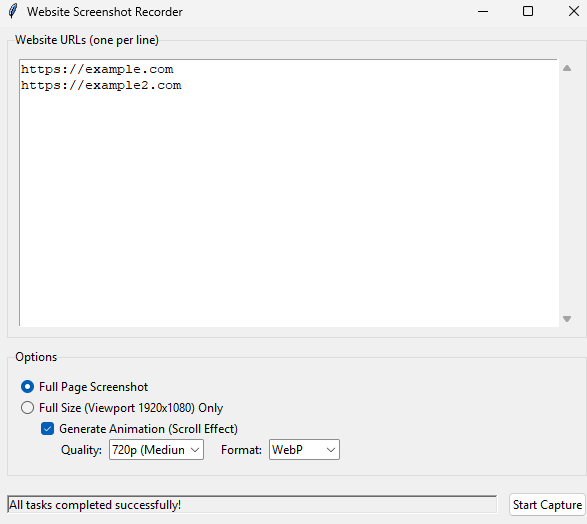
- Full Page Screenshots: Captures the entire height of any webpage, automatically handling lazy loading and scroll animations.
- Viewport Mode: Option to capture only the visible area (1920x1080).
- Smart Scrolling: Automatically scrolls down pages before capturing to ensure all dynamic content and images are loaded.
- Animated Exports: Convert full-page screenshots into scrolling animations.
- Formats: Support for highly efficient WebP and standard GIF.
- Quality Options: Choose between 1080p, 720p, and 480p to optimize file size.
- Bot Detection Evasion: Uses custom headers and locale settings to prevent 403 errors and capture accurate content.
- Modern GUI: Simple and responsive interface built with Tkinter.
Installation
-
Clone the repository:
git clone https://github.com/bugraskl/website-screenshot-recorder.git cd website-screenshot-recorder -
Install dependencies:
pip install -r requirements.txt -
Install Playwright browsers:
playwright install chromium
Usage
-
Run the application:
python main.py -
Enter the website URLs you want to capture (one per line).
-
Select your desired options:
- Full Page Customization: Choose between standard screenshots or generate scroll animations.
- Quality & Format: Select output resolution (e.g., 720p) and format (WebP/GIF).
-
Click Start Capture.
- The app will process each URL in the background.
- Captures are saved in the
screenshotsfolder.
Requirements
- Python 3.8+
- playwright
- Pillow (PIL)
License
This project is open source and available under the MIT License.