Telegram Agent
Manage Codex and Claude Code from Telegram. Resume local sessions, review history, and run tasks on your Windows PC. EN / TR.
- Proje türü
- Open Source
- Dil
- JavaScript
- Yıldız
- 0
- Fork
- 0
Telegram Agent
English · Türkçe
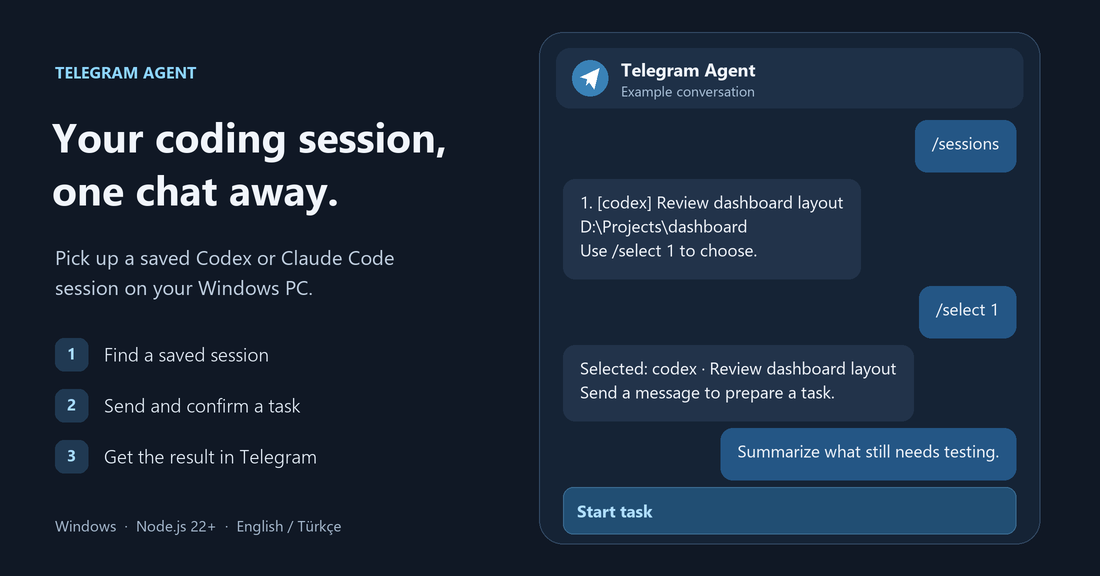
Manage Codex and Claude Code from Telegram. Resume a saved session on your Windows PC, check the recent conversation, and send your next task from your phone.





Download for Windows · Quick start · Commands · Report an issue
Get started
You need Windows, Node.js 22+, and at least one configured assistant. Download the latest release, then extract the ZIP to a permanent folder. You can also clone the repository.
- Create a dedicated bot with BotFather. Open the new bot and send /start.
- Double-click Kurulum.vbs and choose English. You can also run npm run setup from the project folder.
- Enter your bot token and numeric Telegram user ID. @userinfobot can show your ID.
- Check the detected paths to codex.exe and claude.exe. For new sessions, add project entries such as game=D:\Projects\Game.
- Select Connect and start. After the bot confirms the connection, send /sessions.
The local setup link lasts 20 minutes. Open Kurulum.vbs again for a fresh link. Baslat.vbs starts the bot and Durdur.vbs stops it. Stop the bot before changing settings. Keep Windows signed in and the PC awake and online. Startup at sign-in is optional.
What you can do
| Feature | What you can do |
|---|---|
| Resume a session | Find recent local sessions and send a task in the original working folder. |
| Start a session | Choose a project folder configured during setup. |
| Check or stop a task | See elapsed time, receive the result, or stop a task the bot started. |
| Choose file access | Use read mode by default or enable editing within the assistant’s existing permissions. Confirm every task in Telegram. |
Claude Code authentication
For a third-party application, configure Claude Code with an Anthropic Console API key through Claude Code’s supported authentication. You can set an existing Claude profile folder under the executable paths to keep its configuration separate. The bot uses that profile to run the task and the selected local transcript to continue the conversation. It does not read Claude credentials or use the desktop app’s login. For subscription-based access to a live session, Claude provides its own Remote Control and Telegram channel. Anthropic authentication guidance
Telegram commands
| English | Türkçe | Action |
|---|---|---|
| /sessions query | /oturumlar arama | List and optionally filter sessions |
| /select 1 | /sec 1 | Select a numbered session |
| /history | /gecmis | Read recent messages |
| /status | /durum | Check the current task |
| /stop | /durdur | Stop a task started by the bot |
| /mode read · /mode edit | /mod oku · /mod yaz | Switch file access mode |
| /projects | /projeler | List configured projects |
| /new codex game | /yeni codex game | Start a session in a configured project |
| /help | /yardim | Show commands |
Use claude in place of codex for a new Claude Code session. After selecting a session, send a text message and tap Start task. Confirmations expire after five minutes. The bot runs one task at a time for up to 30 minutes.
How it works
flowchart LR
    Phone["Telegram on your phone"] <-->|Private chat| API["Telegram Bot API"]
    Agent["Telegram Agent on Windows"] <-->|HTTPS polling| API
    Agent -->|"Resume saved session"| CLI["Codex CLI / Claude Code CLI"]
    CLI --> Workspace["Local project folder"]
The agent connects to Telegram over outbound HTTPS. The setup page listens only on the PC. Windows DPAPI encrypts the bot token for the current Windows user. Only the configured Telegram account can use the bot in a private chat. Task messages and replies pass through Telegram. Local configuration, logs, and the last result stay under data/, which Git ignores.
Resume sessions after the desktop task finishes. Handle desktop approvals and jobs started outside the bot in the original app. Cloud-only sessions may be absent. Usage limits and tool permissions come from the assistant you run. The current task result shows provider errors. Conversation history filters internal Claude notifications and historical API errors.
Troubleshooting
| Symptom | What to check |
|---|---|
| Setup link expired | Run Kurulum.vbs again. Each local setup link lasts 20 minutes. |
| The bot does not reply | Send /start in a private chat with the bot. Check your numeric user ID and keep the PC awake. Check data/service.log if it still fails. |
| A session is missing | Try a project-name search with /sessions. The list uses locally saved session records. |
| Claude reports a usage limit | Check the account and plan in the selected Claude Code profile. The bot uses that profile’s limits. |
Contributing
Run npm test before opening a pull request. Windows tests run on Node.js 22 and 24 in GitHub Actions. The project has no npm dependencies. For a bug report, include the Windows and Node.js versions, the assistant, and steps to reproduce. Remove tokens, local paths, and private session text from logs before sharing. Open an issue
License
Telegram Agent is available under the MIT License.