Projelere Dön
<p align="center"> Made with ❤️ for the image processing community </p>
Cv2 Threshold Visualizer
CV2 Threshold Visualizer
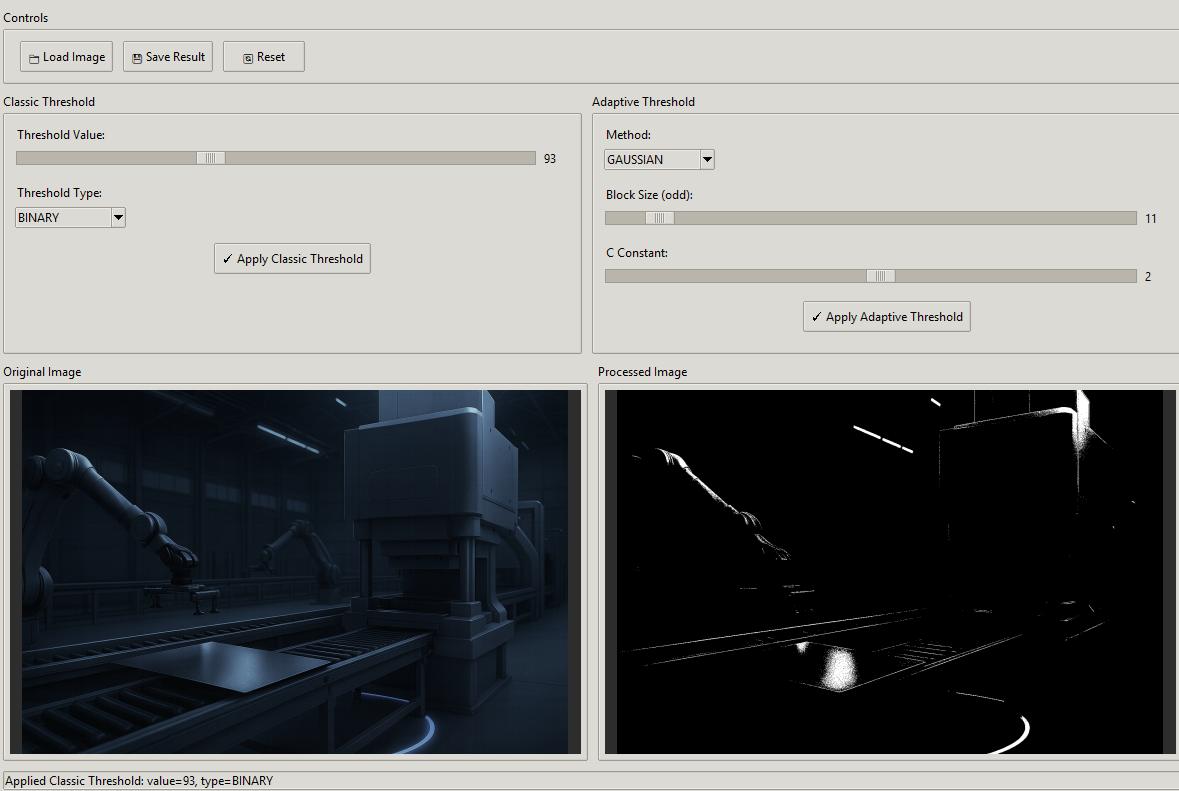
A powerful desktop GUI application for experimenting with OpenCV threshold operations. Upload any image and visualize the effects of different thresholding techniques in real-time.

✨ Features
- 🖼️ Image Upload: Load images in various formats (PNG, JPG, JPEG, BMP, TIFF, WebP)
- 📊 Classic Threshold: Apply simple thresholding with adjustable value (0-255)
- 🔄 Adaptive Threshold: Apply adaptive thresholding with MEAN or GAUSSIAN methods
- 👁️ Side-by-Side Preview: Compare original and processed images instantly
- 💾 Save Results: Export processed images to your desired location
- 🎛️ Real-time Controls: Adjust parameters with intuitive sliders
🚀 Quick Start
Prerequisites
- Python 3.8 or higher
- pip package manager
Installation
-
Clone the repository
git clone https://github.com/bugraskl/cv2-threshold-visualizer.git cd cv2-threshold-visualizer -
Install dependencies
pip install -r requirements.txt -
Run the application
python app.py
📖 Usage
Loading an Image
- Click the "📁 Load Image" button
- Select an image file from your computer
- The original image will appear in the left panel
Classic Threshold
Classic thresholding converts pixels to black or white based on a single threshold value.
- Adjust the Threshold Value slider (0-255)
- Select a Threshold Type from the dropdown:
BINARY: Pixels > threshold → white, else → blackBINARY_INV: Inverse of BINARYTRUNC: Pixels > threshold → threshold value, else → unchangedTOZERO: Pixels > threshold → unchanged, else → blackTOZERO_INV: Inverse of TOZERO
- Click "✓ Apply Classic Threshold"
Adaptive Threshold
Adaptive thresholding calculates threshold values for smaller regions, making it ideal for images with varying lighting conditions.
- Select a Method:
MEAN: Threshold = mean of neighborhood areaGAUSSIAN: Threshold = Gaussian-weighted sum of neighborhood
- Adjust Block Size (must be odd): Size of the neighborhood area
- Adjust C Constant: Value subtracted from the calculated threshold
- Click "✓ Apply Adaptive Threshold"
Saving Results
- Apply a threshold to your image
- Click "💾 Save Result"
- Choose the destination and format (PNG/JPG)
🎯 When to Use Each Method
| Method | Best For |
|---|---|
| Classic BINARY | Simple images with uniform lighting |
| Classic TRUNC | Reducing bright areas while preserving darks |
| Adaptive MEAN | Images with gradual lighting changes |
| Adaptive GAUSSIAN | Images with sharp text or fine details |
📁 Project Structure
cv2-threshold-visualizer/
├── app.py # Main application
├── requirements.txt # Python dependencies
├── README.md # This file
├── LICENSE # MIT License
├── .gitignore # Git ignore rules
└── screenshots/ # Application screenshots
└── demo.png
🛠️ Technical Details
Dependencies
| Package | Version | Purpose |
|---|---|---|
| opencv-python | ≥4.5.0 | Image processing |
| Pillow | ≥9.0.0 | Image display in Tkinter |
| numpy | ≥1.20.0 | Array operations |
Threshold Functions Used
# Classic Threshold
cv2.threshold(gray_image, threshold_value, 255, cv2.THRESH_BINARY)
# Adaptive Threshold
cv2.adaptiveThreshold(
gray_image,
255,
cv2.ADAPTIVE_THRESH_GAUSSIAN_C,
cv2.THRESH_BINARY,
block_size,
c_value
)
🤝 Contributing
Contributions are welcome! Here's how you can help:
- Fork the repository
- Create a feature branch (
git checkout -b feature/amazing-feature) - Commit your changes (
git commit -m 'Add amazing feature') - Push to the branch (
git push origin feature/amazing-feature) - Open a Pull Request
📝 License
This project is licensed under the MIT License - see the LICENSE file for details.
🙏 Acknowledgments
- OpenCV for the powerful image processing library
- Tkinter for the GUI framework
- The Python community for continuous support
<p align="center"> Made with ❤️ for the image processing community </p>
Teknolojiler
Python